Showing posts with label Technoworld. Show all posts

07 February 2012

"there are no categorized items" issue while Installing ADT plugin for eclipse

As one of my friend faced it and told me that while installing ADT for eclipse the software list contained this : "There are no categorized items", solution to this is
Untick the "Group items by category check box" 

24 January 2012

A problem is preventing Windows from accurately checking the license for this computer. Error code: 0x8007000 : Solved

Recently i was fixing somebody's pc. which was giving the above error whenever i tried to boot normally.. However i was able to boot in safe mode with command prompt. This error actually drove me nuts. But finally as always i found the solution.

This usually occurs when these three files are missing or corrupted...

C:\Windows\System32\secupd.dat
C:\Windows\System32\oembios.dat
C:\Windows\System32\oembios.bin

So what you need to do is..

Copy this files from some other Computer having XP installed. or you can also copy them from Windows installation disk. To copy from windows disk you need to do following

1. Boot in safe mode with command prompt : to do that press F8 after the display of your bios.

2. Once you are done. insert windows installation disk and browse to the I386 folder copy the file with extension XXXXX.XX_ where XXXX.XX is the file name with first 2 letters of the extension. Rename it to a .cab file and extract the file to system32.

that means rename the file oembios.DA_ by oembios.cab...

3. reboot and you are done..

If this doesn't work.. let me know...!!

07 January 2012

Issue : intex speakers doesn't play songs from USB...Solved..!!!

So just now one of my cousin called me and said his Intex speaker has stopped playing Music from his USB pen drive... He told me that his speaker's USB port might have stopped working.  So i tried to figure out the solution.. and found it...This problem might occur if you are trying to play your media files from the Pen drive which is formatted as NTFS... the reason is that these Intex speakers are not able to access files in NTFS format, you need to change the format of your pendrive to more simple formats such as FAT or FAT32... So Follow these steps and you will be enjoying your Songs again...

1. Determine the format of your pen drive if it is NTFS or FAT...to do that insert pen drive to PC and right click the drive of USB.. select properties from there.. you will see something like this...
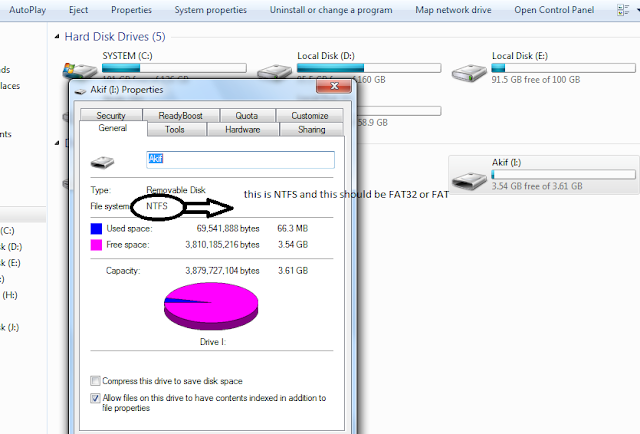

2. If it is NTFS than you need to change it to FAT.. for that Right click again and select format.. and format as FAT... it will look something like this... Remember to take backup before formatting..

3. again copy songs to your pen drive and Enjoy... its working again..

05 January 2012

Nokia s40 V5 lost memory card password issue...!!

Well before few days i gave my nokia 5130 to this friend who accidentally locked the memory card with a password (i never kept the password btw) and he was dumb enough to not remember it.. i got the phone back only to see that memory card was no longer accessible without the password...

I went to the local harware repair shop, where the person told me he could do it but it will format my memory card which i didnt want to.. i saved it for my last choice...
I searched for this online with no luck, but luckily i knew that this passwords are stored in s40v5 in pm files of phone system.. and so i googled some technical term combinations and woha... i got it.. so all you need to get the phone Unlocked is....
1 Nokia PC suite
2 Nemesis Service suite (NSS)
3 Data cable ( obviously )

Steps :
1. Connect your phone in PC Suite mode
2. Open Nemesis Service suite (NSS)
3. Then click on scan for new devices button (top right side)
4. Click "phone info".
5. Now Click "Scan"
6. Select Permanent Memory.
7. Click on Read.

8. It will read the permanent memory file and save it on the disk at following path.
C:\Program Files\NSS\Backup\pm\<IMEI>.pm
9. Open the .pm file using Notepad.
10. Now scroll until field [308], and on the 5th Record (5=) your security code is saved at there.
11. Like 5=
31323334350000000000
12. Remove all  alternate "3" digits and it will be 31323334350000000000
13. 123454 is your security code.

This method definitely works for symbian operating system phones.. i have tested it and i am glad i did..!!!